> ## Documentation Index
> Fetch the complete documentation index at: https://docs.mileapp.dev/llms.txt
> Use this file to discover all available pages before exploring further.
# Multi Trip
Multi Trip is a route optimization feature that allows vehicles to return to the hub for reloading before starting subsequent trips. This enables a single vehicle to complete multiple delivery routes within the same working period.
By default, route optimization assigns a single trip per vehicle. With **Multi Trip** enabled, vehicles can complete their first trip, return to the hub to reload, and then start a new trip with additional visits.
**Key Characteristics:**
* Allows vehicles to return to hub during working hours
* Enables multiple trips per vehicle in one working period
* Useful when visits exceed single vehicle capacity
* Automatically enables Return to Hub when activated
## Activate Multi Trip
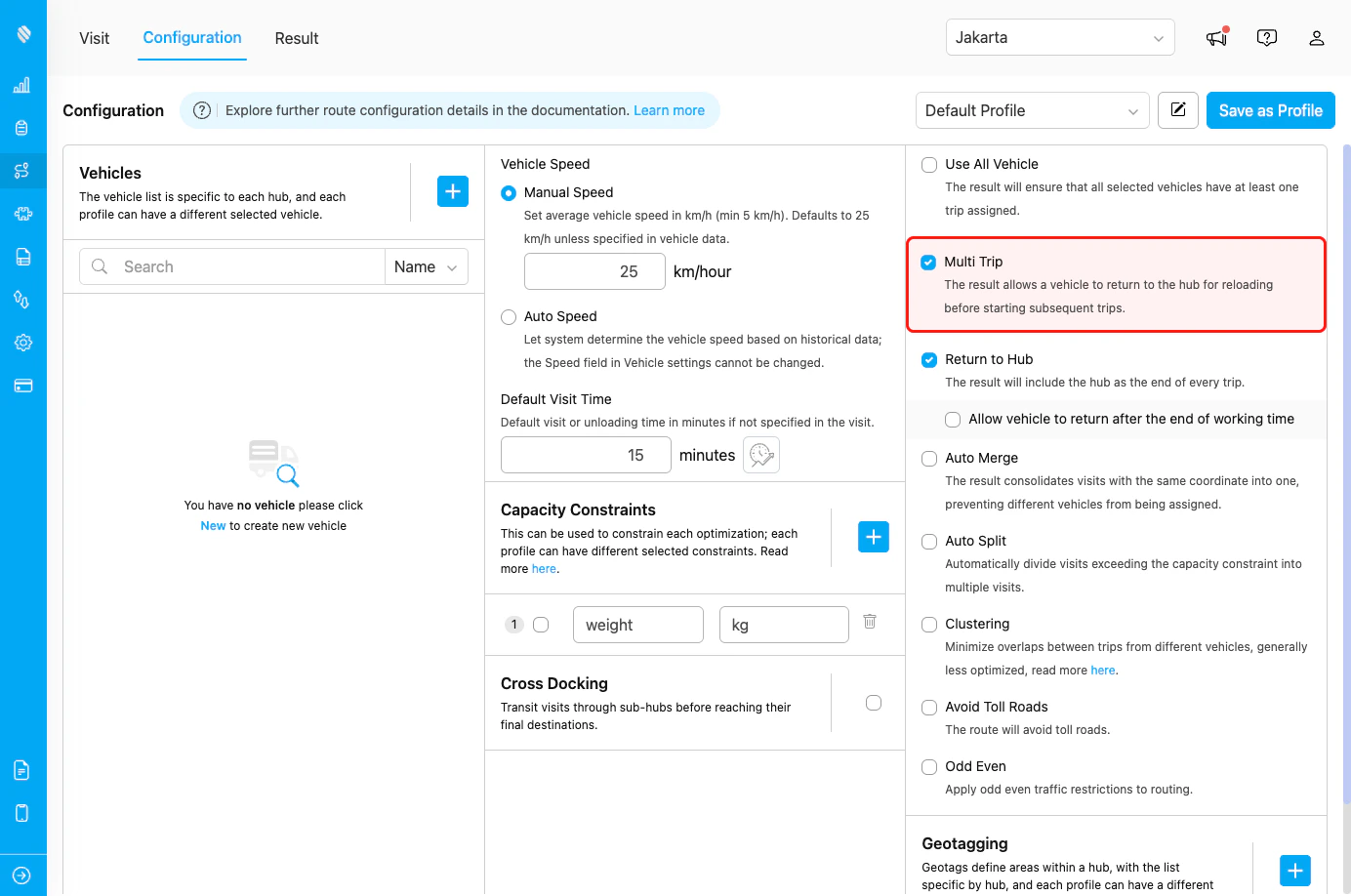
To activate Multi Trip, follow these steps:
1. Go to the Routing/Configuration menu.
2. Check the "Multi Trip" checkbox.
Multi Trip configuration checkbox
Once enabled, the routing engine will allow vehicles to make multiple trips by returning to the hub for reloading between trips.
When you enable Multi Trip, Return to Hub is automatically enabled. This is because vehicles must return to the hub to reload before starting their next trip.
## How Multi Trip Works
### Without Multi Trip (Default Behavior)
Each vehicle is assigned a single continuous route:
1. **Objective**: Complete all assigned visits in one trip
2. **Constraint**: Limited by vehicle capacity
3. **Result**: Some visits may not be assigned if capacity is exceeded
4. **Use case**: When all visits fit within vehicle capacity
**Example:**
* Vehicle capacity: 20 packages
* Total visits: 35 packages
* Result: Vehicle 1 handles 20 packages, Vehicle 2 handles 15 packages
### With Multi Trip Enabled
Vehicles can make multiple trips:
1. **Objective**: Maximize visit completion with multiple trips
2. **Flexibility**: Return to hub for reloading
3. **Result**: Same vehicle can handle more visits across trips
4. **Use case**: When visits exceed single-trip capacity
**Example:**
* Vehicle capacity: 20 packages per trip
* Total visits: 35 packages
* Result: Vehicle 1 makes 2 trips (20 + 15 packages)
## Use Cases
### Use Case 1: High-Demand Days
**Scenario:** A delivery company has 50 deliveries but only 3 vehicles available, each with capacity for 20 deliveries.
**Configuration:**
* Multi Trip: Enabled
* Return to Hub: Automatically enabled
* Vehicle capacity: 20 deliveries each
**Result:** Each vehicle makes 2 trips, completing all 50 deliveries with available fleet.
### Use Case 2: Perishable Goods
**Scenario:** Food delivery service needs to maintain product freshness by reducing time between pickup and delivery.
**Configuration:**
* Multi Trip: Enabled
* Shorter routes per trip
* Frequent hub returns
**Result:** Multiple short trips ensure fresh delivery while maximizing vehicle utilization.
### Use Case 3: Mixed Load Types
**Scenario:** Logistics company handles different product types requiring separate trips (fragile, heavy, temperature-sensitive).
**Configuration:**
* Multi Trip: Enabled
* Capacity constraints by product type
* Return to Hub for load switching
**Result:** Same vehicle handles different load types across multiple trips.
## Best Practices
### When to Use Multi Trip
**✓ Use when:**
* Total visits exceed single-trip vehicle capacity
* You want to maximize vehicle utilization
* Working hours are long enough for multiple trips
* Hub location is centrally positioned for efficient returns
* Cost of multiple trips is lower than adding more vehicles
* Visits are geographically clustered near the hub
**✗ Avoid when:**
* Visits fit comfortably in single-trip capacity
* Hub location is far from service area (high return cost)
* Working hours are too short for multiple trips
* Time windows don't allow for hub returns
* Travel time to hub exceeds efficiency gains
### Combining with Other Features
**Works well with:**
| Feature | Recommendation |
| ----------------------- | ----------------------------- |
| **Return to Hub** | Automatically enabled |
| **Capacity Constraint** | Essential for trip separation |
### Relationship with Return to Hub
Multi Trip has a special relationship with Return to Hub:
| Action | Behavior |
| --------------------- | -------------------------------------- |
| Enable Multi Trip | Return to Hub is automatically enabled |
| Disable Return to Hub | Multi Trip is automatically disabled |
| Enable Return to Hub | Multi Trip remains as configured |
This dependency exists because multi-trip routing requires vehicles to return to the hub between trips.
## Frequently Asked Questions
**Q: How many trips can a vehicle make?**
A: There's no fixed limit. The optimization engine determines the optimal number of trips based on working hours, vehicle capacity, visit locations, and time constraints.
**Q: Does Multi Trip increase total distance?**
A: Yes, typically. Vehicles must return to the hub between trips, adding distance compared to a single continuous route. However, it may reduce overall fleet size needed.
**Q: Can I control the number of trips per vehicle?**
A: The optimization engine automatically determines the optimal number of trips. You can influence this through capacity constraints and working hours.
**Q: Does Multi Trip work with time windows?**
A: Yes, the engine respects visit time windows when planning multiple trips. Trips are sequenced to meet time window constraints.
**Q: Will all vehicles make multiple trips?**
A: Not necessarily. The engine optimizes trip distribution across vehicles based on capacity, location, and time constraints. Some vehicles may have single trips while others have multiple.
**Q: How does this affect driver working hours?**
A: The optimization respects configured working hours. All trips, including hub returns, must fit within the vehicle's working time.
## Related Documentation
* [Route Optimization Configuration Introduction](/pages/route-optimization/configuration/introduction)
* [Use All Vehicle](/pages/route-optimization/configuration/use-all-vehicle)
* [Capacity Constraint](/pages/route-optimization/configuration/capacity-constraint)
* [Clustering](/pages/route-optimization/configuration/clustering)