This page overviews the deleted items, each accessible in JSON format. The following categories of deleted data are available for viewing:
  1. Schedule
  2. Role
  3. Task
  4. Flow
  5. Automation
  6. Routing Result
  7. Data
  8. Data Type
  9. User
  10. Vehicle
  11. Hub
  12. Team In the Trash list, you’ll find essential details about each deleted item, including:
  • Name: The name of the deleted item.
  • Type: The category or type of data that was deleted.
  • Date Deleted: The time indicating when the item was deleted.
  • Deleted By: The user responsible for the deletion.
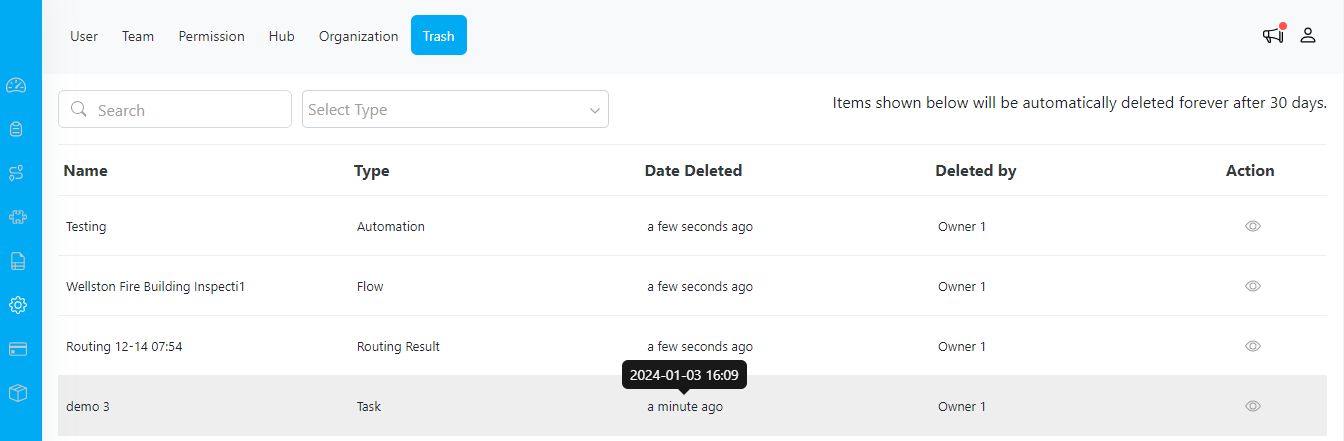
Please note that items shown below will be automatically deleted forever after 30 days.
image

Setting/Trash page

Additionally, there is an option to view the deleted data in JSON format, providing a structured and detailed representation. This feature allows for a comprehensive understanding of the deleted content.