

This step-by-step guide walks through the full short-token flow: generate one programmatically, embed it via Custom Module, and resolve it on the receiving side.Documentation Index
Fetch the complete documentation index at: https://docs.mileapp.dev/llms.txt
Use this file to discover all available pages before exploring further.
Prerequisites
- A valid MileApp bearer token (JWT). Get one from the Authentication flow.
- A Custom Module configured in MileApp Settings with a URL field. See Settings → Custom Module → Add Custom Module.
- An external service ready to receive the URL invocation and resolve the short token.
Step 1 — Embed {SHORT_TOKEN} in Custom Module URL
When configuring or editing a Custom Module, use the {SHORT_TOKEN} placeholder anywhere in the URL string:
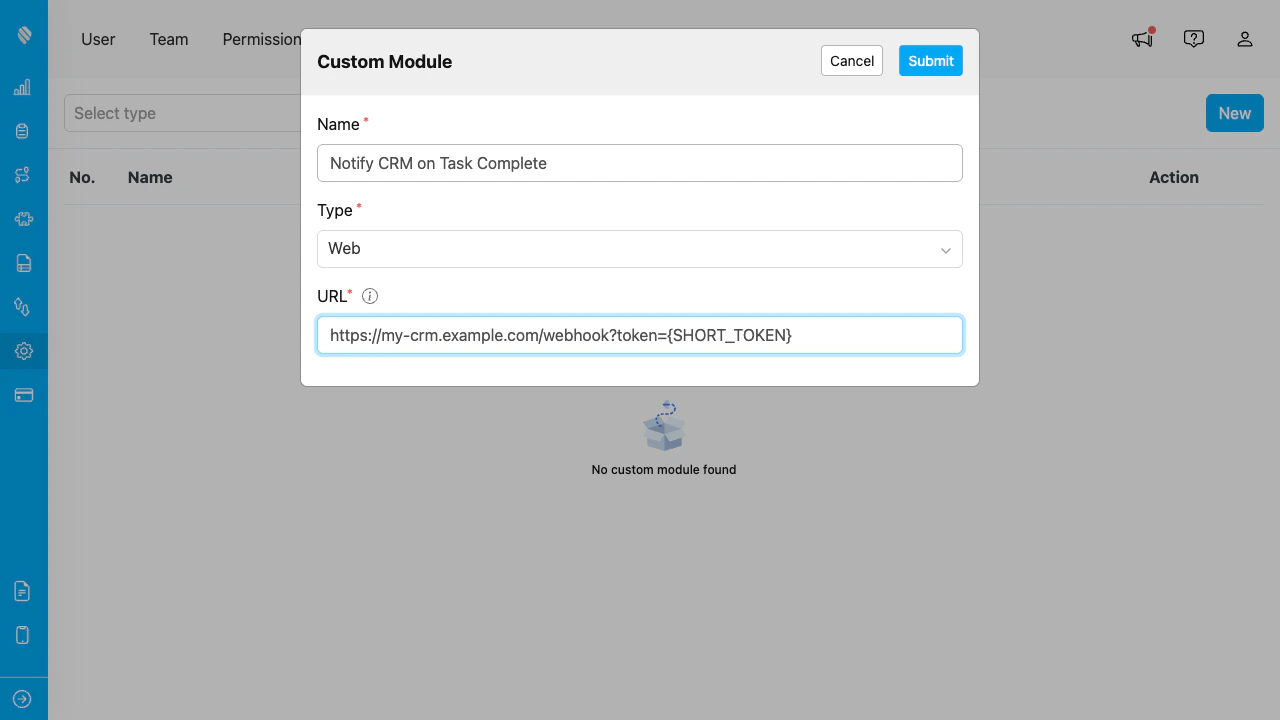
The Add/Edit Custom Module dialog at Settings → Custom Module. Place {SHORT_TOKEN} wherever your external service expects the credential. Hover the info icon next to the URL label for a quick reminder.
You do not need to call
POST /short-token/generate yourself for the Custom Module use case. MileApp handles generation server-side at invocation time.The Generate endpoint is intended for cases where your own application needs to mint a short token to pass to another system — see Step 2 below.Step 2 — Generate Short Token Programmatically (advanced)
If you need to mint a short token outside the Custom Module context (e.g., in your own integration code), call the Generate endpoint with the current bearer token:shortToken— opaque string, ~18 characters. Embed in URL or pass to downstream service.expiresAt— Unix timestamp. After this moment, resolve will return 400.
Step 3 — Receive and Resolve
When your external service receives a URL with the short token, immediately resolve it:bearerToken in subsequent calls back to MileApp APIs (e.g., to update a task on behalf of the user). Use userId and organizationId for authorization decisions on your own side.
Step 4 — Handle Failure Cases
The resolve endpoint returns 400 Bad Request when:- Short token has expired (more than 5 minutes since generation)
- Short token never existed (typo, tampering, replay attack)
- Short token format is malformed
Security Considerations
- Treat short token as you would a password. Don’t log it, don’t send it in error reports, don’t store it.
- TLS only. All calls to
apiweb.mile.appare HTTPS. Don’t extract short tokens from any plaintext channel. - Resolve once, immediately. Don’t queue resolves. Don’t share short tokens across services.
- Bearer token returned by resolve is the user’s real bearer. Treat the bearer with normal JWT precautions — limit blast radius, log access, etc.