

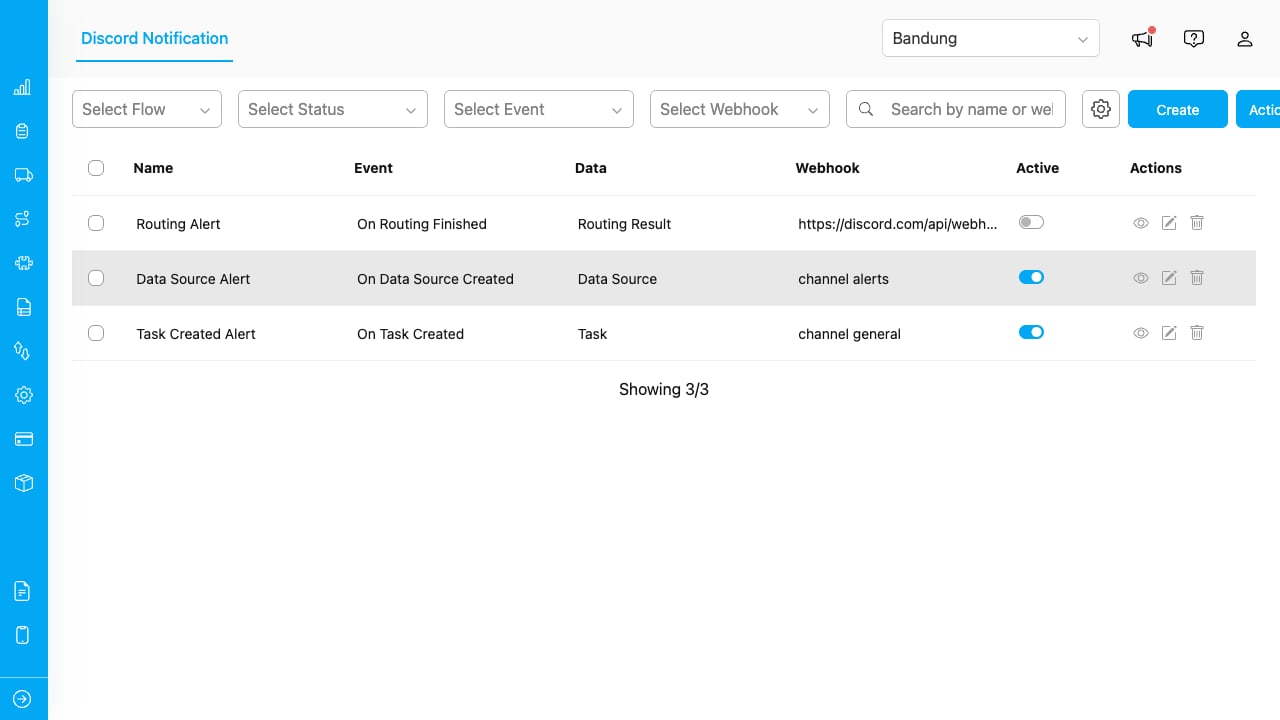
The Discord Notification Manager lists all configured automations with their event type, webhook, and status.
Key Concepts
- Automation: A rule that listens for an event and sends a Discord message when it fires. Each automation is linked to one event and one webhook.
- Webhook: A Discord Webhook URL that points to a specific channel on your Discord server. You generate it inside Discord’s channel settings.
- Event: The trigger that fires the automation. Supported events include task creation, task assignment, task completion, data source creation, routing results, and trip start/finish.
- Message Builder: The editor where you compose the Discord message, insert dynamic variables (task data, flow fields, mentions), apply markdown formatting, and preview the result in real time.
- Mention: A pre-configured Discord user or role that can be tagged inside a message so they receive a notification on Discord.
Who Uses Discord Notification
- Administrators and Managers: Set up the add-on, configure webhooks and mentions, create automations, and monitor delivery through Discord.
- Team Members on Discord: Receive notifications in their channels without needing to log in to the platform.
What You Can Do
- Set up the add-on with a guided wizard that verifies permissions and configures your webhooks
- Create automations that send rich messages with dynamic data to Discord channels
- Manage automations from a central table: search, filter, activate, deactivate, edit, or delete
- Configure settings to add or remove webhooks, mentions, and default bot identity