

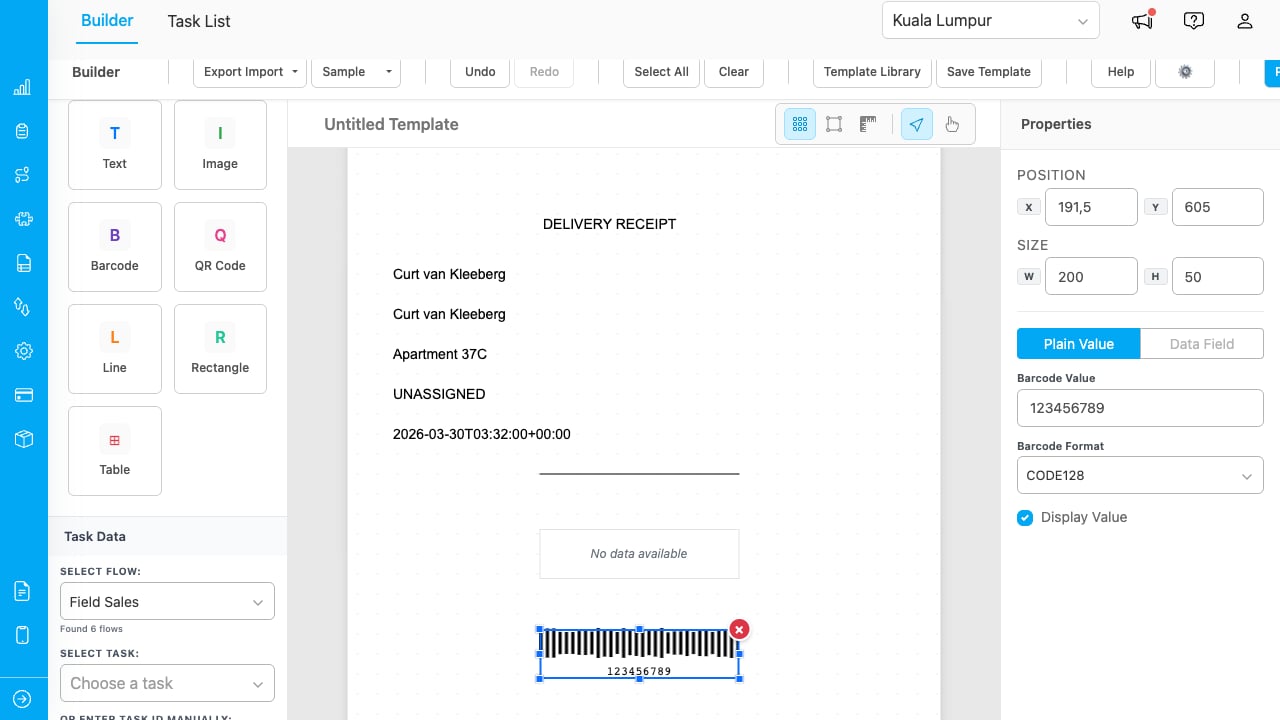
The Builder page with a delivery receipt template showing resolved task data from a Field Sales flow.
Key Concepts
- Template: A reusable layout with positioned elements. Templates are saved to your organization and can be shared across users.
- Elements: The building blocks of a template. There are 7 types: Text, Image, Barcode, QR Code, Line, Rectangle, and Table.
- Data Field Binding: Text and image elements can pull values directly from task data. When you select “Data Field” mode, the element resolves to the actual value (e.g., customer name, address) when previewing or printing.
- Plain Value: Static text or template variables using
{{fieldName}}syntax. Data Field mode (dropdown selection) is recommended for reliable resolution. - Print Preview: A live preview of how your template looks with task data before printing or exporting.
What You Can Do
- Set up the add-on with a guided wizard
- Design templates with a drag-and-drop canvas builder
- Print and export individual or multiple tasks as PDF
- Use the Task List to find tasks and print in bulk
Who Uses Invoice Generator
- Administrators: Set up the add-on, design templates, and manage print settings.
- Field Managers: Use the Task List to select tasks and print delivery receipts or invoices in bulk.
- Operations Team: Export PDFs for record-keeping or send to customers.