

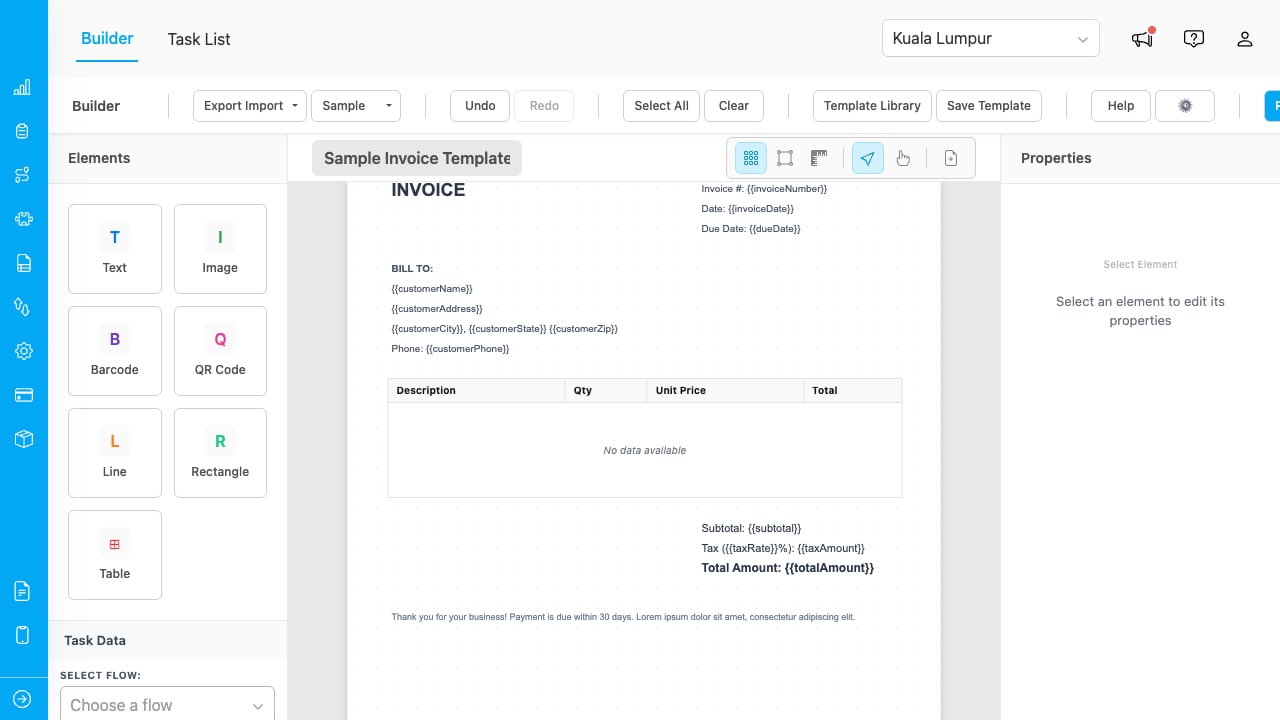
The PDF Generator builder with a sample invoice template loaded.
Key Concepts
- Template: A reusable document layout containing text, images, barcodes, QR codes, tables, lines, and rectangles. Templates are bound to task data and can span multiple pages.
- Element: A building block placed on the canvas. Seven types are available: Text, Image, Barcode, QR Code, Line, Rectangle, and Table.
- Data Field Binding: Elements can display static content or pull values from task data. Switch any element to “Data Field” mode to bind it to a task variable.
- Multi-Page Canvas: Templates can have multiple pages. Elements belong to a specific page, while header and footer zone elements repeat across all pages.
- Watermark: A semi-transparent text overlay rendered behind all elements on every page.
- Conditional Visibility: Elements can be shown or hidden based on task data values, letting a single template adapt to different scenarios.
What You Can Do
- Set up the add-on with a one-time setup wizard.
- Design templates using a drag-and-drop builder with multi-page support, header/footer zones, watermarks, and conditional elements.
- Print and export documents as PDFs with selectable text, embedded images, and barcodes.
- Use the Task List to browse tasks, apply filters, and print single or multiple documents at once.
Who Uses PDF Generator
- Administrators: Set up the add-on, configure permissions, and design document templates.
- Field Managers: Create templates for delivery receipts, inspection reports, and other field documents, then print them in bulk from the Task List.
- Operations Teams: Use the Task List to filter, review, and export PDFs for archival or distribution.