

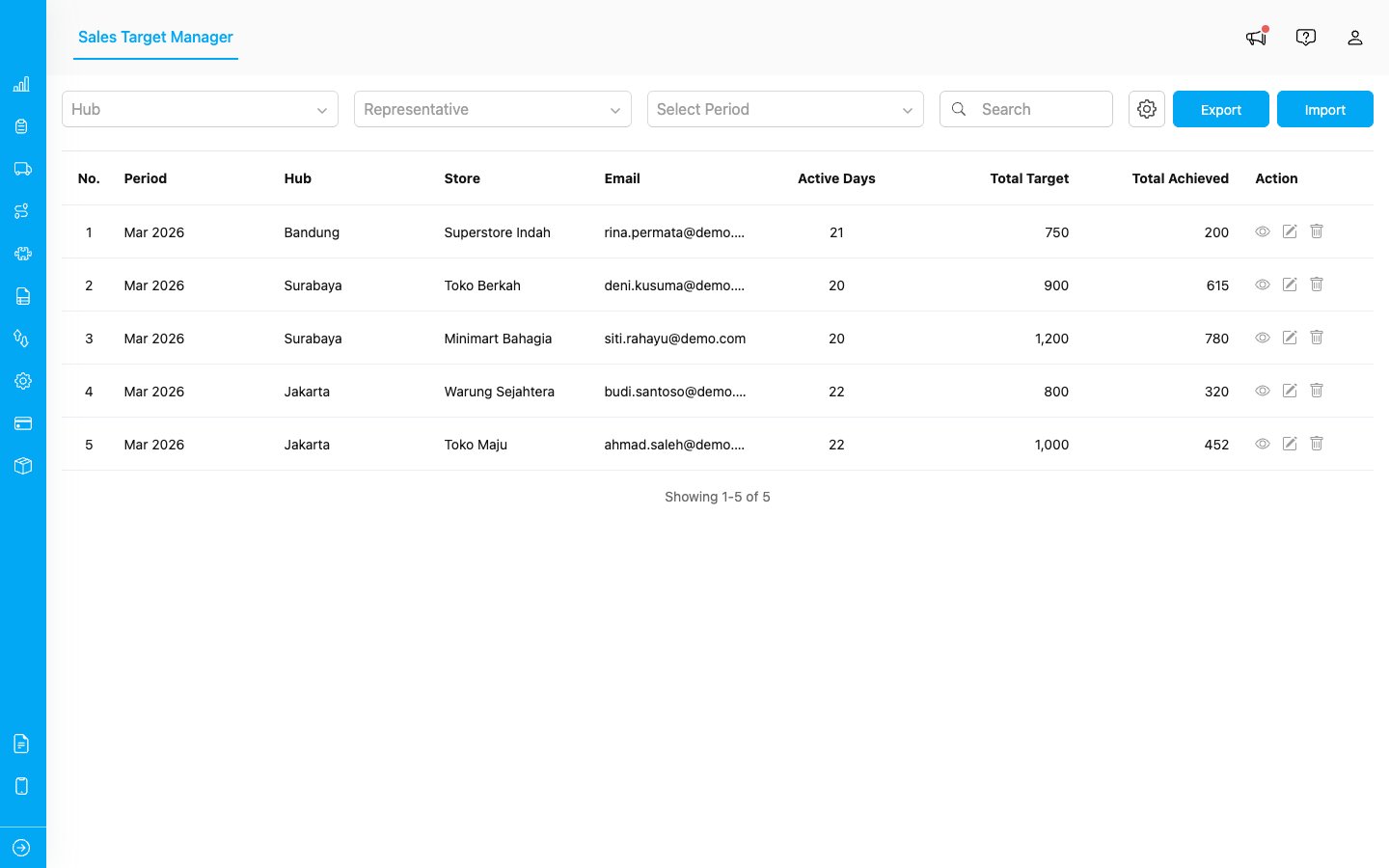
The Sales Target Manager shows all targets in a table with period, location, email, and achievement data.
Key Concepts
Before getting started, here are the main concepts used throughout Sales Target:- Period: The month and year a target applies to (e.g., March 2026). Targets are always set on a monthly basis.
- Categories: Product groupings that break down your targets (e.g., Food, Beverages, Electronics). You define these during setup.
- Active Days: The number of working days in the month for a representative. Used to calculate daily targets.
- Total Target: The overall sales goal for the month.
- Daily Target: Automatically calculated by dividing the total target by the number of active days.
- Achievement: The actual sales collected from completed tasks. This is updated automatically as your reps complete their work in the field.
Who Uses Sales Target
Sales Target serves two types of users:- Administrators and Managers: Set up the add-on, create and manage targets for the team, import targets in bulk, and monitor overall progress from the Manager page.
- Sales Representatives: View their personal targets and track daily progress using the My Target add-on, which is a separate add-on that must be installed independently.
What You Can Do
- Set up the add-on with a guided wizard that walks you through the configuration step by step
- Manage targets for your team: view details, edit goals, and delete records
- Import and export targets in bulk using Excel files
- Track personal targets on the My Target page with real-time progress updates