

What is Clustering?
Clustering groups visits into distinct clusters and assigns each cluster to a specific vehicle. This prevents vehicles from crossing into each other’s service areas, creating clear territorial boundaries for each route. Key Characteristics:- Reduces overlap between vehicle routes
- Creates distinct service territories per vehicle
- May result in longer total distances compared to fully optimized routes
- Useful when you prioritize clear route separation over absolute optimization
Activate Clustering
To activate Clustering, follow these steps:- Go to the Routing/Configuration menu.
- Check the “Clustering” checkbox.
- Select one of two overlap prevention options:
- Minimum overlap
- No overlap
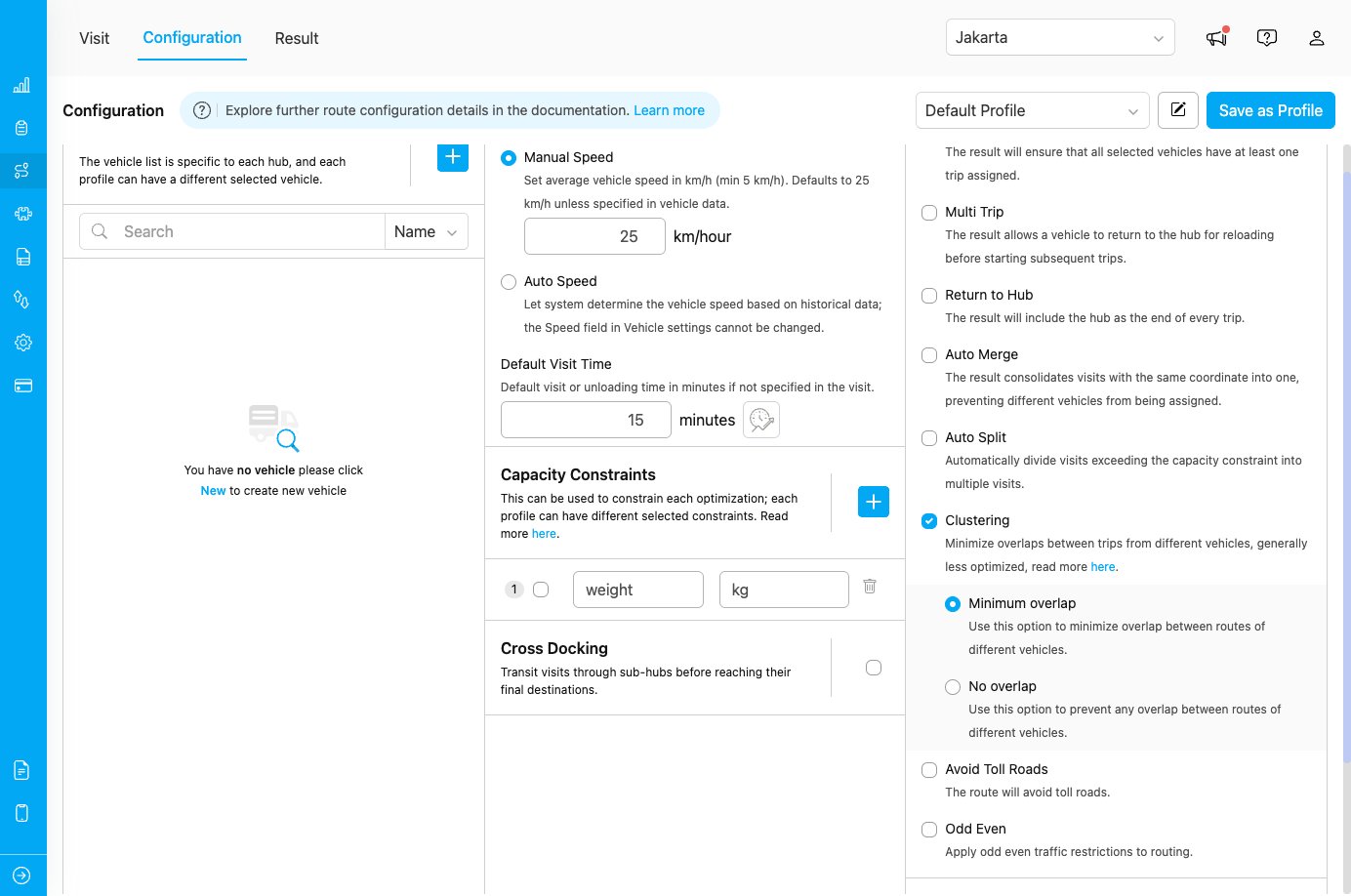
Clustering configuration showing overlap options
Clustering Options
After enabling clustering, you can choose between two overlap prevention strategies:1. Minimum Overlap
Use this option to minimize overlap between routes of different vehicles. Some overlap may still occur, but it will be kept to a minimum. When to use:- When complete separation is not critical
- When you want better overall route optimization while still reducing overlap
- For service areas with complex geography where some overlap is acceptable
- Better route efficiency compared to no overlap
- Slightly more flexible routing
- Some vehicles may still cross into nearby territories
2. No Overlap
Use this option to prevent any overlap between routes of different vehicles. Routes will be completely separated with no crossing service areas. When to use:- When strict territorial separation is required
- For compliance or operational policies requiring distinct service zones
- Strictest territorial boundaries
- May result in longer total distances
- Less routing flexibility
How Clustering Works
Without Clustering
Vehicles may visit locations across the entire service area, potentially crossing paths and overlapping routes for optimal efficiency.With Clustering
- Visits are grouped into clusters based on proximity
- Each cluster is assigned to a specific vehicle
- Vehicles operate within their assigned cluster territory
- Overlap is minimized or prevented based on selected option
Use Cases
Use Case 1: Regional Sales Teams
Scenario: Sales representatives with assigned territories Configuration:- Clustering: Enabled
- Clustering Option: No Overlap
Use Case 2: Delivery Fleet with Territory Preference
Scenario: Drivers prefer consistent territories but can occasionally cross boundaries Configuration:- Clustering: Enabled
- Clustering Option: Minimum Overlap
Use Case 3: Mixed Urban and Rural Areas
Scenario: Some vehicles serve dense urban areas while others handle rural regions Configuration:- Clustering: Enabled
- Clustering Option: Minimum Overlap
Best Practices
When to Use Clustering
✓ Use clustering when:- You need clear territorial boundaries between vehicles
- Drivers have assigned regions or service areas
- Reducing route overlap is more important than absolute optimization
- You want to prevent confusion from overlapping routes
- You have geographically distinct service areas
- You prioritize minimum total distance over territorial boundaries
- Your service area is small and overlap is not an issue
- You need maximum route optimization efficiency
- Visits are densely packed in a small area
- You have very few vehicles serving a large area
Choosing Between Minimum and No Overlap
Geotagging vs. Clustering
Clustering is often confused with Geotagging, because both divide work across geographic areas. The difference is who defines the areas and what the feature is for. Clustering is automatic. You do not draw anything. The routing engine groups nearby visits into clusters and assigns each cluster to a vehicle, aiming to minimize overlap between different vehicles’ routes. The engine derives the territory boundaries from where the visits actually are, so they can change from one optimization to the next, and the engine — not you — decides which vehicle serves which area. Geotagging is manual. You draw the zone boundaries yourself as fixed polygons on the map. Every visit inside a zone automatically receives that zone’s tag, and when the same tag is set on specific vehicles, only those vehicles are allowed to serve that area. The boundaries stay the same on every run, so you control exactly where each zone is and which vehicles serve it. In short: use Clustering when you want the engine to keep routes compact and separated without predefining zones; use Geotagging when the territories are already known and specific vehicles must be tied to specific areas.The two features can be combined. Use Geotagging to enforce which vehicles are allowed in an area (via tags), and enable Clustering to keep the resulting routes compact and non-overlapping.