

What is Field Accessibility?
Field Accessibility allows administrators to hide specific fields from task and data source views on a per-role, per-flow (or per-data-type) basis. When a field is marked as hidden for a role, users assigned to that role will not see the field in task lists, task detail views, data source lists, or API responses. This feature is useful for:- Data privacy — preventing field workers from viewing sensitive customer information such as phone numbers or addresses
- Simplified interfaces — reducing visual clutter by hiding fields that are not relevant to a particular role
- Compliance — ensuring that only authorized roles can access regulated or confidential data fields
How Field Accessibility Works
Field accessibility rules are configured inside the permissionDetails of a role. Each rule targets a specific flow (for tasks) or data type (for data sources) and specifies a list of fields to hide. When a user with a configured role accesses tasks or data sources:- The system checks the user’s role for any field accessibility rules matching the task’s flow or the data source’s data type.
- Any fields listed in the
hiddenFieldsarray are automatically removed from the response. - If a user explicitly requests a hidden field via the API
fieldsparameter, the request is rejected with a 403 Forbidden error.
Supported Scopes
Field accessibility can be configured for two permission scopes: Task Fields — Controls which task fields are visible when viewing tasks belonging to a specific flow. The rule is matched by flowId. Data Source Fields — Controls which data source fields are visible when viewing data sources belonging to a specific data type. The rule is matched by dataTypeId.Configure Field Accessibility
To configure field accessibility for a role:- Go to Setting > Permission menu.
- Select the role you want to configure.
- Locate the Field permission section for tasks or data.
- In the permission row, click the tag area to open the field accessibility editor.
- Select the flow or data type you want to restrict.
- Choose the fields you want to hide from the available field list.
- Click Save to apply the changes.
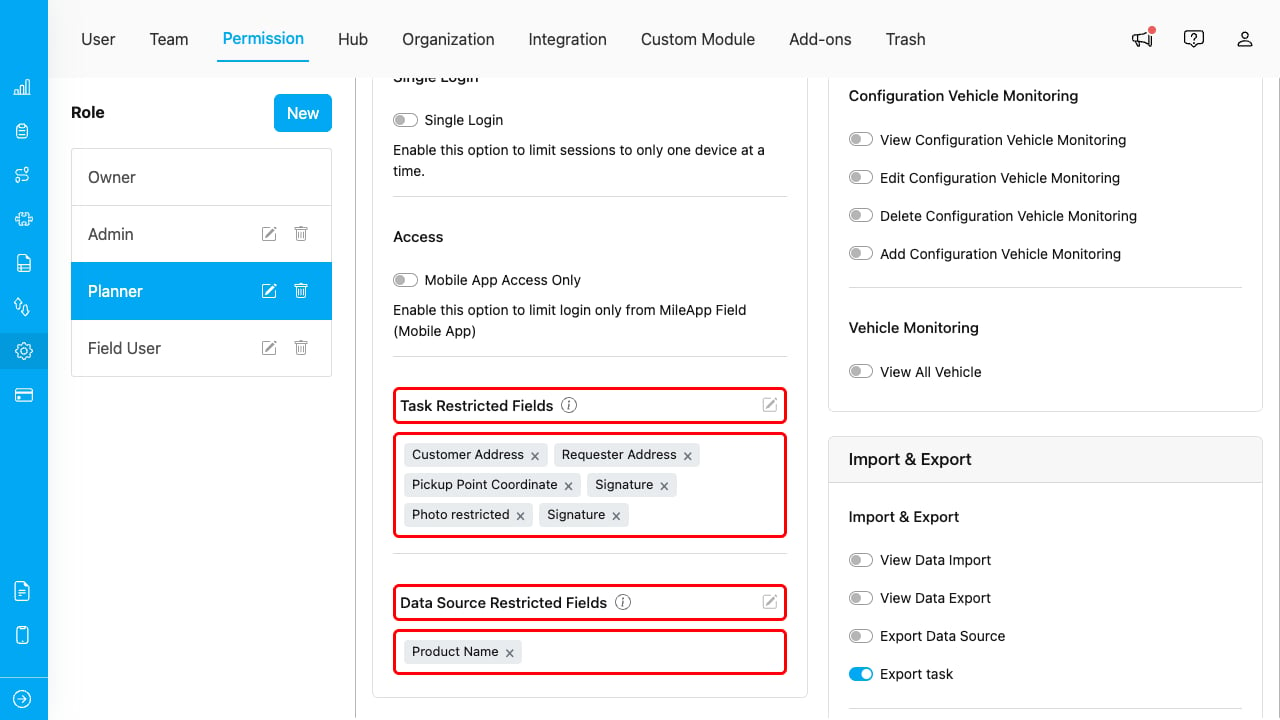
Field accessibility tags showing restricted fields per flow in the permission settings
Repeat this process for each flow or data type that needs field restrictions.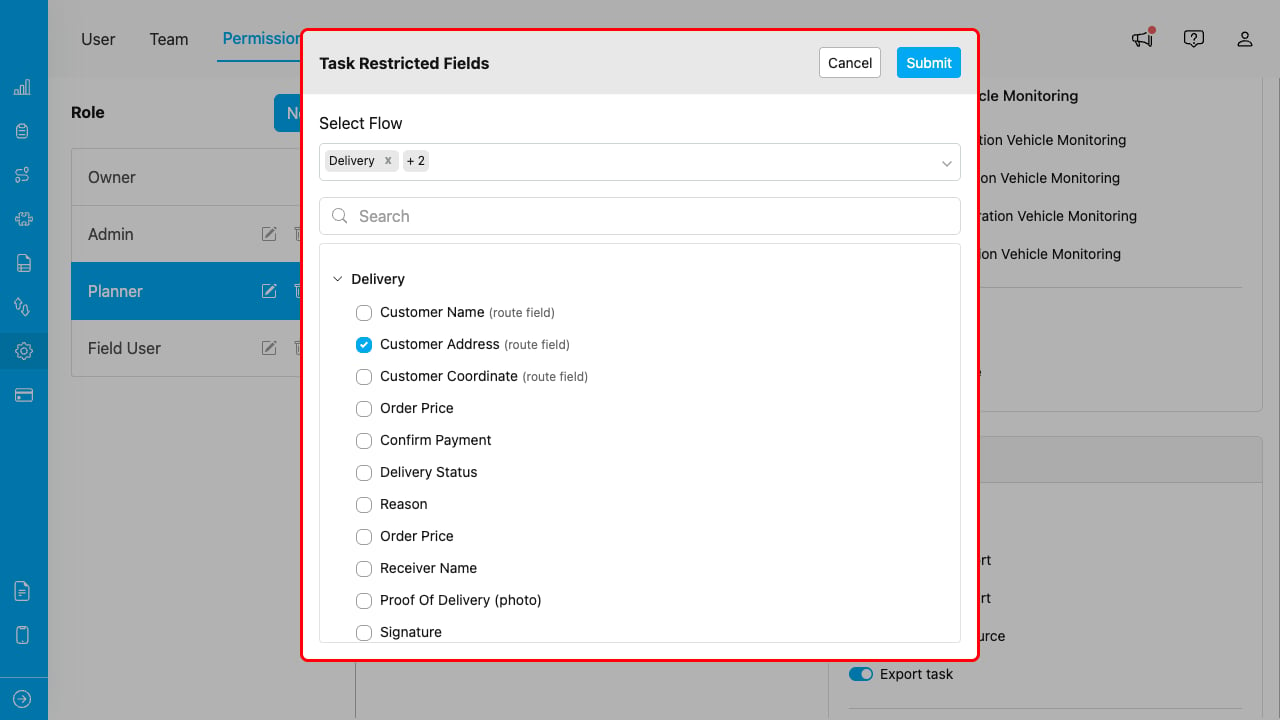
Modal editor for selecting hidden fields for a specific flow
Required permission:
- View Permission
- Edit Permission
Behavior Details
Web Interface
When field accessibility is configured:- Hidden fields do not appear in the task list table columns.
- Hidden fields do not appear in the task detail view.
- Hidden fields do not appear in data source list and detail views.
- Users cannot add hidden fields back to their column configuration.
API Responses
When field accessibility is configured:- Hidden fields are automatically stripped from GET responses for tasks and data sources.
- If a user includes a hidden field in the
fieldsquery parameter, the API returns a 403 Forbidden error. - The restriction applies to both list endpoints and single-resource endpoints.
What is Not Affected
- Task creation and editing — Field accessibility only affects read (view) operations. Users with edit permissions can still submit values for hidden fields when creating or updating tasks.
- Export — Export operations follow their own field selection and are not affected by field accessibility.
- Automation — Automation rules and actions can reference any field regardless of field accessibility settings.
Use Cases
Use Case 1: Protecting Customer Contact Information
Scenario: A delivery company wants drivers to see delivery addresses but not customer phone numbers. Configuration:- Select the “Driver” role
- For the delivery flow, add
customerPhoneto the hidden fields list - Drivers can still complete deliveries but cannot view phone numbers
Use Case 2: Role-Based Data Segregation
Scenario: An organization uses data sources to store outlet information, but sales reps should not see contract financial details. Configuration:- Select the “Sales Rep” role
- For the outlet data type, hide fields like
contractValueandpaymentTerms - Sales reps see outlet names and locations but not financial data
For API Integration
For detailed API specifications on how field accessibility affects API endpoints, refer to the following resources:- Role API — permissionDetails with hiddenFields
- Task API — field accessibility behavior on GET endpoints
- Data Source API — field accessibility behavior on GET endpoints