

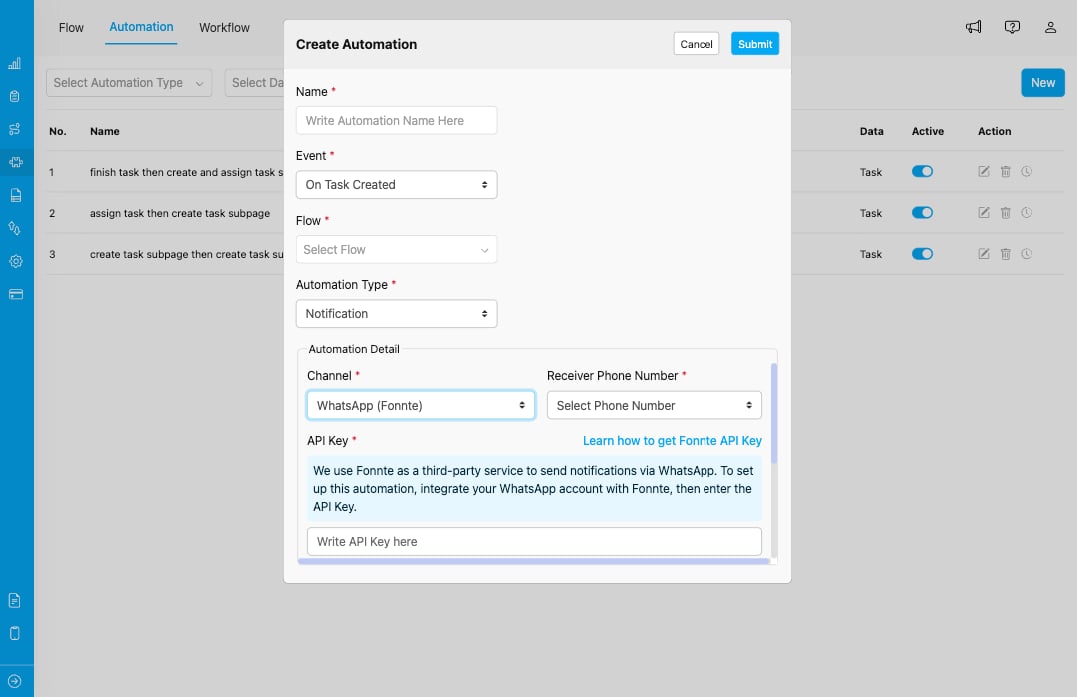
Notification automation type configuration with WhatsApp (Fonnte) channel settings
Configuration Fields
When you select Notification as the automation type, you need to configure the following settings:1. Channel *
Select the communication channel through which notifications will be sent. Currently, MileApp supports:- WhatsApp (Fonnte) - Send notifications via WhatsApp using Fonnte integration
- Email - Send notifications via email with To/Cc/Bcc recipients, a rich text body, and inline images. See Email Channel for full configuration details.
- SMS - Send a plain text SMS to a phone number captured on the task, with
{{ }}placeholders and a character guideline. Currently visible to MileApp internal accounts only during rollout. See SMS Channel for full configuration details.
2. Receiver Phone Number *
Select the phone number field from your Flow that contains the recipient’s phone number. This field will be used to determine who receives the notification. The dropdown will show available phone number fields from the Flow you selected in the Event configuration.3. API Key *
Enter your Fonnte API Key to authenticate and enable WhatsApp message sending. How to get Fonnte API Key:- Fonnte is a third-party service that enables WhatsApp messaging integration
- You need to integrate your WhatsApp account with Fonnte first
- Once integrated, you’ll receive an API Key from Fonnte
- Learn how to get Fonnte API Key
4. Message *
Customize the notification message that will be sent to recipients. You can use placeholders that will be automatically replaced with actual data: Available Placeholders:{{ organization name }}- Your organization’s name{{ tracking link }}- Link to track the task
Use Cases
Customer Delivery Notifications
Send automatic WhatsApp messages to customers when:- A task is created for their delivery
- A driver is assigned to their delivery
- A delivery is completed
Team Alerts
Notify team members via WhatsApp when:- High-priority tasks are created
- Tasks are assigned to them
- Important events occur in the system
Status Updates
Send automated status updates to customers or stakeholders about:- Order processing stages
- Delivery progress
- Task completion confirmations
Best Practices
- Test Messages: Send test notifications to verify the message format and placeholder replacement before activating
- Clear Communication: Write clear, concise messages that provide essential information
- Placeholder Usage: Always keep the placeholders in your message template for dynamic data
- API Key Security: Keep your Fonnte API Key secure and don’t share it publicly
- Phone Number Format: Ensure phone numbers in your Flow are in the correct format for WhatsApp delivery